Settings
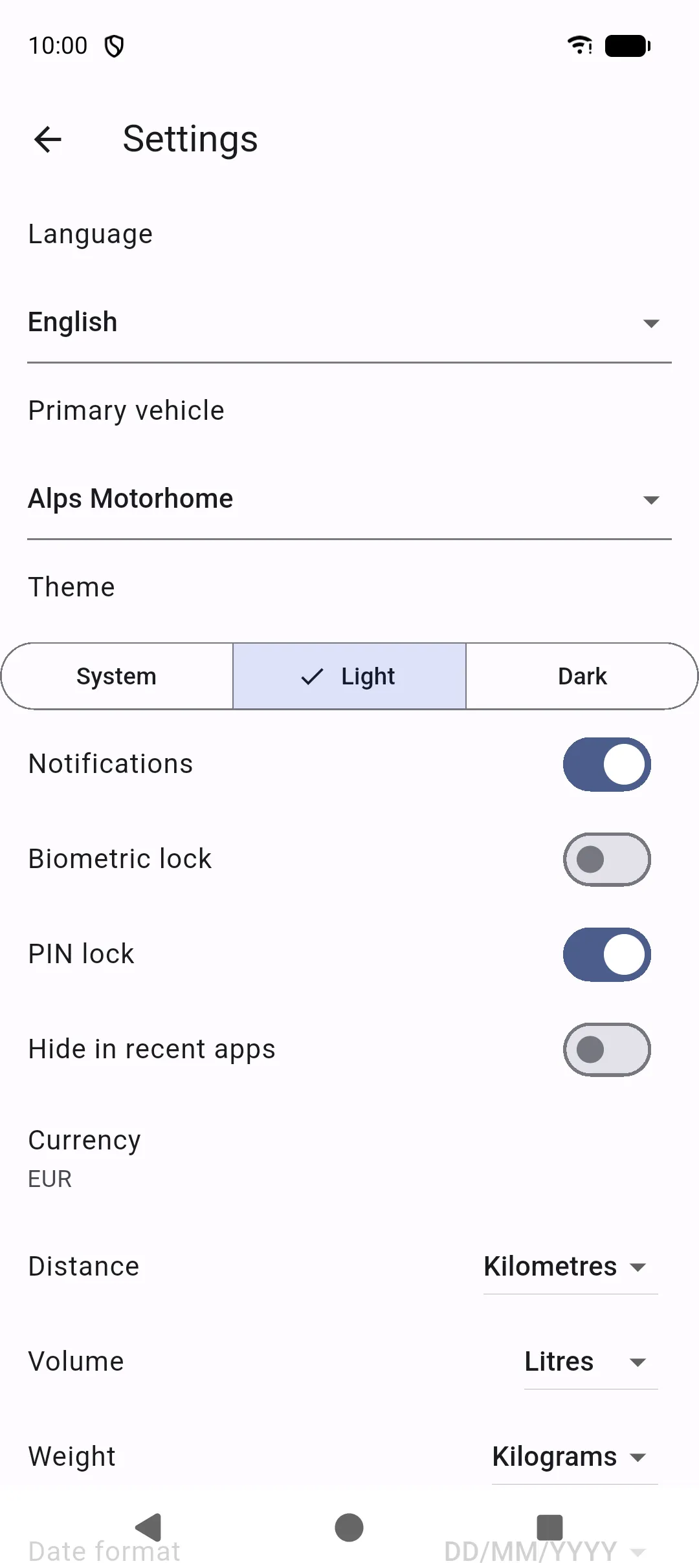
More → Settings controls how SAKCarLog looks and how the device protects the logbook.
Language and appearance
Section titled “Language and appearance”- Language — same list as first launch (English, French, German, Italian, Spanish, Portuguese, Portuguese (Brazil), Dutch, Polish).
- Theme — system, light, or dark.
- Date format — system default or a fixed pattern (day/month/year, ISO, and dotted variants).
Vehicle and units
Section titled “Vehicle and units”- Primary vehicle — default vehicle when several exist.
- Currency — code used on expenses and fuel (for example EUR).
- Distance — kilometres or miles.
- Volume — litres or gallons.
- Weight — kilograms or pounds.
Changing units updates how values are shown; enter new readings in the unit you selected.
Notifications
Section titled “Notifications”Turn Notifications on so reminders and document-expiry alerts can appear. Android may also ask for notification and exact-alarm permission. Turning notifications off cancels scheduled alerts.
- PIN lock — set a PIN of at least 4 digits. The lock screen appears when you return to the app.
- Biometric lock — fingerprint or face unlock if the phone supports it. SAKCarLog only receives success or failure; biometric templates stay in the operating system. Enable PIN or be ready to unlock after you leave the app; biometrics apply the next time the app is paused.
- Hide in recent apps — hides the preview thumbnail in Android Recents.
Delete all data
Section titled “Delete all data”The bottom of Settings has Delete all data. Confirming erases every record, photo, and document on this device and returns you to the welcome screen.
This cannot be undone unless you have an exported backup. Uninstalling SAKCarLog also removes the local store from that phone.